Your crew. Your call.
Hand off the jobs you keep putting off: plans, research, tickets and forms. Helpers work on your Mac, and nothing goes out until you say yes, on your Mac or iPhone.

The Mac app comes from here. iPhone, iPad and Apple Watch from the App Store.
Start on your Mac. iPhone, iPad and Apple Watch are in public beta.
Just say what you need.
Follow along. Nothing goes out until you say yes.
Three example chats. Nollie adds Scout to check every morning for Turnstile tickets in London, then passes on the sale date Scout found. Nollie looks at your calendar, finds a free Saturday for Gran's 80th and asks before adding it. Nollie fills in a council form on its own computer and asks before submitting a broken streetlight report.
iPhone, iPad and Apple Watch
In your pocket.
On your wrist.
Your helpers work on your Mac at home. You keep up from wherever you are.
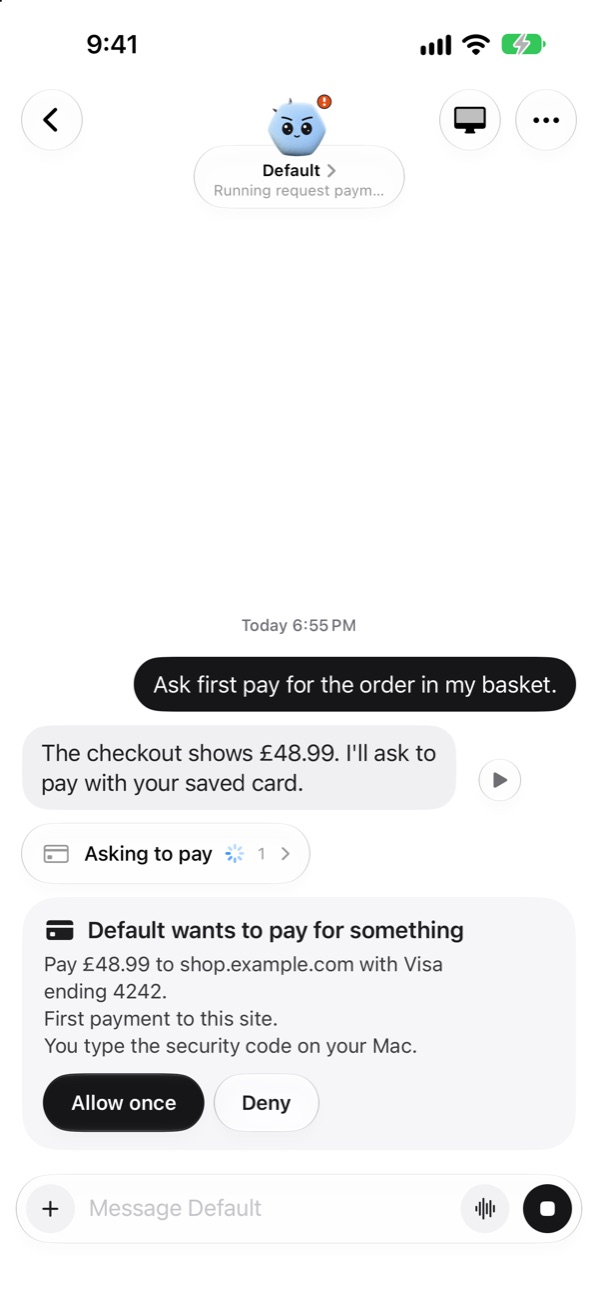
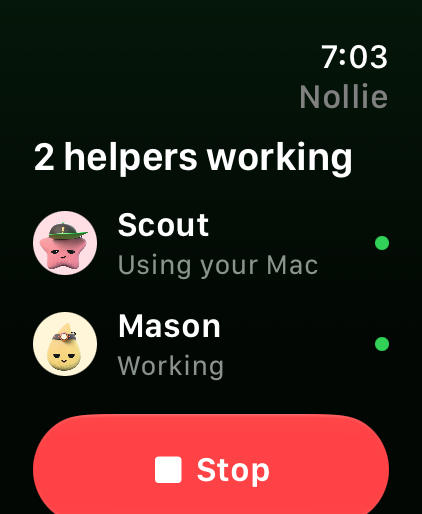
Nollie on iPhone, asking before it pays £48.99 with a saved Visa ending 4242. Nollie on Apple Watch, showing two helpers working and a big Stop button.
-
Talk to it
Talk mode for a spoken chat, and a play button to hear any reply.
-
Yes from your wrist
Answer from Apple Watch, feel each answer land, and see who's working. Paying and sending go to your iPhone.
-
One big Stop
On your Watch, and on your Lock Screen while a helper uses your Mac.
-
Siri, too
Ask a helper something and hear the reply. Or stop them all at once.
-
iPad and Duo
Your helpers in a sidebar, beside the chat.
-
Away from home
Chat, answer and Stop through your own iCloud, while your Mac is awake.
For your life
A helper for
every errand.
Add one in a tap. Nollie can add more when a job needs them.
-
Planner
Turns a busy week into a plan.
-
Shopper
Finds and compares. Never buys without your yes.
-
Researcher
Reads the web and shows its sources.
-
Trip planner
Plans the trip and keeps bookings together.
-
Event scout
Finds shows and tickets worth going to.
-
Home admin
Warranties, meter readings and bin days.
-
Small gigs this weekend
Shows near you, every Saturday, with where to get tickets.
-
A long weekend in Lisbon
Flights, a place to stay and a plan for each day, with every source linked.
-
That jacket, under £60
Name your price. You hear the day it drops.
-
The car insurance renewal
What the letter means, what to ask, and a reminder before the date.
-
A week that fits
School runs, the big shop and a dentist visit, planned around your calendar.
-
A form, done from the bus
A helper fills it in. You tap the final yes.
Share a helper with someone at home. They get their own chats, and anything that needs a yes comes to you.
Trust you can see
See what happened.
Even afterwards.
Plain words on what your helpers did, and why.
-
Papertrail
Each time a helper asked an online model, searched the web, opened a page or connected somewhere: when, where to, and why.
-
Night shift and your week
Each morning, what ran overnight waits at the top of your chat, with a Why? on every step. On Sunday evenings, the whole week, with one tap to pause or turn something off.
-
Pay only with your yes
Helpers only ever see “Visa ending 4242”. Paying waits for you and Face ID, and you type the security code each time.
-
What it remembers
See, edit or forget what each helper knows. Or switch memory off.
-
Rules, not guesses
Sending, buying, posting and deleting wait for your yes, in every helper. Fixed rules decide that, not the AI.
-
Stop what Papertrail can't see
One switch on your Mac. Anything a helper starts that tries to go around Papertrail is stopped.
-
Your Mac, only where you say
When a helper needs your Mac, a model on your Mac does the clicking, only in the apps you pick. Screenshots never leave it.
-
Nothing of ours in between
No Nollie account, no analytics and no servers of ours. API keys stay in your Keychain, updates ask before they install, and logs stay on your Mac, without the words of your chats.
Quick pay, off unless you turn it on, lets small payments to sites you've paid before skip the question.
Getting started
No terminal.
No settings files.
The Mac app sets itself up. You choose a brain and scan a code.
-
Get Nollie for Mac
It fetches what it needs on its own, about 180 MB. Or tap Try a demo and look around first.
-
Choose its brain
Sign in with the ChatGPT or Claude plan you already have, or download a model that runs on your Mac.
-
Scan the code
Get the iPhone beta and scan the code your Mac shows. Your Watch comes along.
Made with care
Every helper
has a face.
So you can tell at a glance who's busy, who's done and who needs you.
-
Busy
-
Done
-
Needs you
Calm, clear and made for Apple devices, in light and dark.
Hand it off.
Keep the final say.
Free, at home or at work. Made by one person in London.
A Mac with Apple silicon on macOS 26. iPhone and iPad on iOS 26, Apple Watch on watchOS 26.
16 GB of memory suggested for a model on your Mac. 8 GB is fine with a ChatGPT or Claude plan. Letting a helper use your Mac needs 32 GB.